

Home > Shop > DJI Zenmuse P1 > DJI Care Ent. Plus P1


€753,00€622,31 - €1.302,00€1.076,03Prijsklasse: €753,00€622,31 tot €1.302,00€1.076,03
Excl. BTW
Incl. BTW
✔ Klantbeoordeling: 9,6 / 10
✔ Gratis verzending bij bestellingen boven €99
✔ Standaard EU-garantie inbegrepen
✔ Veilige betalingen met SSL-versleuteling
✔ Persoonlijke klantenservice
✔ Snelle & betrouwbare levering
✔ Meerdere betaalmethoden beschikbaar
✔ ISO 9001 gecertificeerd


✔ Klantbeoordeling: 9,6 / 10
✔ Gratis verzending bij bestellingen boven €99
✔ Standaard EU-garantie inbegrepen
✔ Veilige betalingen met SSL-versleuteling
✔ Persoonlijke klantenservice
✔ Snelle & betrouwbare levering
✔ Meerdere betaalmethoden beschikbaar
✔ ISO 9001 gecertificeerd
✔ Klantbeoordeling: 9,6 / 10
✔ Gratis verzending bij bestellingen boven €99
✔ Standaard EU-garantie inbegrepen
✔ Veilige betalingen met SSL-versleuteling
✔ Persoonlijke klantenservice
✔ Snelle & betrouwbare levering
✔ Meerdere betaalmethoden beschikbaar
✔ ISO 9001 gecertificeerd
€753,00€622,31 - €1.302,00€1.076,03Prijsklasse: €753,00€622,31 tot €1.302,00€1.076,03
Excl. BTW
Incl. BTW
✔ Klantbeoordeling: 9,6 / 10
✔ Gratis verzending bij bestellingen boven €99
✔ Standaard EU-garantie inbegrepen
✔ Veilige betalingen met SSL-versleuteling
✔ Persoonlijke klantenservice
✔ Snelle & betrouwbare levering
✔ Meerdere betaalmethoden beschikbaar
✔ ISO 9001 gecertificeerd
| Product | DJI Care Ent. Plus P1 |
| EAN | 6941565908537 |
| Serviceperiode | 1 jaar |
| Comprehensive After-Sales Services |
Vernieuw uw DJI Care Enterprise Plus en geniet van nog een jaar onbeperkte gratis reparaties binnen de dekkingslimiet en meerdere exclusieve voordelen.
|
| Accidentele Schade Dekking |
DJI Care Enterprise Plus biedt onbeperkte gratis reparaties binnen de dekkingsperiode, inclusief schade door ongelukken zoals crashes, waterschade, signaalinterferentie en bedieningsfouten.
|
| Onbeperkt Aantal Gratis Reparaties | Ja |
| Sneller Vliegen met Gratis Verzending |
DJI Care Enterprise dekt verzendkosten voor het versturen en terug ontvangen van reparatieservices, voor een handige en efficiënte service-ervaring.
|
|
*Beschikbaar in regio’s gedekt door DJI Care Enterprise. Extra kosten buiten de dekking zijn voor de gebruiker.
|
|
| Product | DJI Care Enterprise Basic(P1)EU |
| Regio | EU (Europese Unie) |
| Dekking | Onopzettelijke schade, hardwarestoringen en vervangingen |
| Ondersteuning | Snelle ondersteuning met prioriteit |
| Service | Exclusieve reparatie- en vervangingsopties |
| Digitaal product |
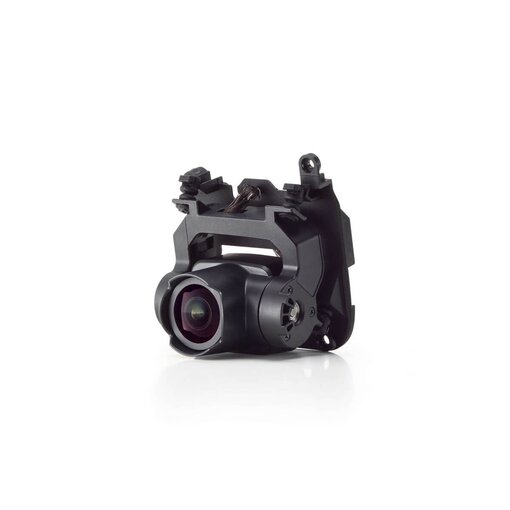
| DJI Zenmuse P1 |
DJI Care Enterprise is an after-sales service plan specially designed for DJI Enterprise products, allowing you to fly with peace of mind without worrying about accidental damage. DJI Care Enterprise offers three packages that provide tailor-made and comprehensive services based on your needs:
DJI Care Enterprise Basic
For accidental damage to DJI Enterprise products during normal use and operation within the coverage period, two replacements are offered, and each replacement costs a small additional fee.DJI has the right to require you to send back such components or reject your DJI Care Enterprise service request
DJI Care Enterprise Plus
For accidental damage to DJI Enterprise products during normal use and operation within the coverage period, a free repair or replacement service is available, provided that your total coverage amount is sufficient for the deduction of a fee equivalent to the damage assessment cost. Shared coverage can be extended to other DJI Enterprise devices bound to DJI Care Enterprise Plus within 30 calendar days after the first activation and binding.
DJI Care Enterprise Basic (2-Year Plan)
For accidental damage to DJI Enterprise products during normal use and operation within the coverage period, up to four replacements are offered by paying certain replacement service fee. In addition, official warranty is provided for the covered components during the validity period of the service plan.
DJI Care Enterprise Basic
The 12-month service period comes into effect at 0:00 on the start date and expires at 24:00 on the expiration date, as specified in the service agreement.
DJI Care Enterprise Plus
The 12-month service period comes into effect at 0:00 on the start date and expires at 24:00 on the expiration date, as specified in the service agreement.
DJI Care Enterprise Basic (2-Year Plan)
The 24-month service period comes into effect at 0:00 on the start date and expires at 24:00 on the expiration date, as specified in the service agreement.
* Even if the benefits of your DJI Care Enterprise have already been used up before expiration, the renewed DJI Care Enterprise service plan will not come into effect in advance.
The service plans are available in the U.S., Canada, the UK, EU countries, Switzerland, Norway, Liechtenstein, Iceland, Serbia, Monaco, Australia, Japan, South Korea, Mexico, Hong Kong and Mainland China.
The supported regions and version of the service plan may vary slightly for certain models.
(1) Replacement Fee and Coverage Amount
① For the DJI Care Enterprise Basic or DJI Care Enterprise Basic (2-Year Plan) service plan, you need to pay a small replacement fee. Please click here for more details on the replacement fee.
② For the DJI Care Enterprise Plus, you will not have to pay any additional fees if the replacement cost is within the coverage amount. Please click here for more details on the coverage amount.
If the balance of your coverage amount is insufficient to pay for the repair or replacement fee, you will need to make up for the exceeding amount in order to enjoy the repair or replacement service.
③ To use the DJI Care Flyaway Coverage service, you will need to pay additional replacement fee. Please click here for more details on the replacement fee.
(2) Shipping Fees and Taxes
Any two-way shipping fee incurred within the country or region for which you are requesting to use the DJI Care Enterprise service plan shall be borne by DJI. If you wish to send your product back internationally or across regions, you must first obtain the consent of DJI, and any tariffs and custom clearance, shipping, and other fees shall be borne by you. DJI has the right to refuse to provide this service if any of the above criteria is not met.
(1) First time purchase conditions and instructions
DJI Care Enterprise includes DJI Care Enterprise Basic, DJI Care Enterprise Basic (2-Year Plan), and DJI Care Enterprise Plus. You can choose one according to your needs.
Purchase and bind DJI Care Enterprise if your DJI Enterprise device meets any of the following conditions:
① The DJI Enterprise device is brand-new and unactivated;
② The DJI Enterprise device has been activated for less than 15 days;
③ Less than 72 hours have passed after the DJI Enterprise device was repaired by an official DJI Service Center.
If your product does not meet the aforementioned binding conditions but falls within the warranty period, please record a video following DJI Care Enterprise Video Verification Tutorial and upload it to the Cloud or designated video platform. After the video is uploaded, please refer to the video verification application template and send an email to videoverification@dji.com. We will review the video and reply to your email within 1-3 business days. After the verification is passed and you receive a purchasing notice, you can purchase and bind DJI Care Enterprise within 72 hours.
If the product is not covered under warranty, you can request to send the device back for inspection through the official DJI online repair service request page. Following a successful inspection, you can purchase and bind DJI Care Enterprise within 72 hours of receiving the purchase notification.
(2) Renewal conditions and instructions
You can renew DJI Care Enterprise Basic if meets all the following conditions:
① DJI Care Enterprise Basic or DJI Care Enterprise Basic (2-Year Plan) is purchased and the total purchased and bound service duration does not exceed 2 years;
② DJI Care Enterprise purchased has not yet expired or expired within 15 days.
You can renew DJI Care Enterprise Plus if meets all the following conditions:
① DJI Care Enterprise Plus is purchased and the total purchased and bound service duration does not exceed 2 years;
② DJI Care Enterprise purchased has not yet expired or expired within 15 days.
If your product does not meet the aforementioned binding conditions, please record a video following DJI Care Enterprise Video Verification Tutorial and upload it to the Cloud or designated video platform. After the video is uploaded, please refer to the video verification application template and send an email to videoverification@dji.com. We will review the video and reply to your email within 1-3 business days. After the verification is passed and you receive a purchasing notice, you can purchase and bind DJI Care Enterprise within 72 hours.
DJI Care Enterprise Basic and DJI Care Enterprise Plus do not support cross-renewal. Therefore, if you purchase DJI Care Enterprise Basic or DJI Care Enterprise Basic (2-Year Plan) in the first year, you can only renew the Basic plan. Similarly, when you purchase DJI Care Enterprise Plus in the first year, you can only renew the Plus plan.
(1) First year binding
If you have purchased the DJI Care Enterprise activation code, you need to activate and bind the service plan to your device using the activation code on DJI’s official website.
If your purchased DJI Enterprise product includes the first year of DJI Care Enterprise (Auto-Activation Version), or if you have purchased DJI Care Enterprise (Auto-Activation Version) separately, the DJI Care Enterprise binding page will automatically appear in the app used for product activation once you successfully activate your DJI Enterprise product. You will need to provide the necessary information on this page to complete the binding of the DJI Care Enterprise service plan.
* Please note that for the auto-activation version, if you choose to skip the DJI Care Enterprise binding page, or if the page does not appear due to server, network, or other issues, your DJI Care Enterprise will automatically bind to your DJI Enterprise product within 24 hours of activation. The default user information for the bound DJI Care Enterprise will be the app account details used during product activation. If there is an error in the bound user information, please contact DJI Support for assistance.
(2) Renew binding
When renewing DJI Care Enterprise with an activation code, it is necessary to bind the activation code on the DJI Care Enterprise Official Website Page.
If you have purchased both the DJI Care Enterprise Basic (2-Year Plan) service activation code and the DJI Care Enterprise Basic service activation code simultaneously, kindly bind the DJI Care Enterprise Basic (2-Year Plan) first and then proceed to renew DJI Care Enterprise Basic.
If you renew DJI Care Enterprise on DJI Store, the renewal service plan will be automatically bound to your device without additional operation required.
After activation, you can go to the online query page DJI Status Check to check the service status.
If you purchased DJI Care Enterprise Plus with several DJI Enterprise products and completed the service binding within 30 calendar days, you can choose whether to share the coverage amounts. The specific steps are as follows:
(1) If you purchase a DJI Care Enterprise Plus activation code, you need to use the activation code to bind it on the DJI’s official website. If you bind multiple activation codes at the same time, the system will automatically enable coverage sharing. If you use activation codes separately, you can select “Bind More Devices” on the activation page within 30 calendar days of the first activation to include more devices in the shared coverage.
(2) If the DJI Enterprise product you purchased (such as DJI Matrice 4T and DJI Matrice 4E) includes the first year of DJI Care Enterprise Plus (Auto-Activation Version), or if you purchased DJI Care Enterprise Plus (Auto-Activation Version) separately, please note that this service plan currently supports binding with only one device in the system and cannot automatically achieve coverage sharing as described in point (1). If you wish to share the coverage amounts of this service plan across different devices, you need to first activate the devices and complete the DJI Care service binding (see Question 8 for details). Then, click here to register the serial numbers of the devices that require shared coverage and submit an application. DJI will complete the review within 3-5 business days. If approved, you will be able to share the coverage amounts among the registered devices.
Under DJI Care Enterprise Basic, DJI Care Enterprise Basic (2-Year Plan), the number of replacements for multiple drones or payloads cannot be shared.
If you purchased DJI Care Enterprise Plus with several DJI Enterprise products, within calendar 30 days after the first activation and binding, you can choose whether to share the coverage amounts.
If you choose to share the coverage amounts, the renewed DJI Care Enterprise Plus coverage will be shared automatically.
Coverage amounts cannot be shared in any other case, including but not limited to the following scenarios:
(1) The coverage amount of DJI Care Enterprise Plus cannot be shared with other DJI Enterprise products for which no DJI Care Enterprise Plus has been purchased.
(2) The coverage amount of DJI Care Enterprise Plus for the first binding cannot be shared with the coverage amount of the renewed DJI Care Enterprise Plus.
If you have purchased and bound DJI Care Enterprise Basic or DJI Care Enterprise Basic (2-Year Plan) , you can apply for DJI Care Express service, provided that your service plan is still valid, and at least one replacement is remaining. In the event of any damage to your Enterprise product during normal operation within the coverage period, after you submit a repair request through the correct procedure, DJI will send you a brand-new or equivalent to brand-new products in performance and reliability immediately upon receiving your damaged product.
DJI Care Express supports Product< click here >
The following products can enjoy a standard maintenance service when DJI Care Enterprise Basic is purchased and bound: Matrice 30, Matrice 30T, DJI Mavic 3E, DJI Mavic 3T, DJI Mavic 3M and DJI Mavic 3T Advanced.
The following products can enjoy two standard maintenance service when DJI Care Enterprise Basic (2-Year Plan) is purchased and bound: DJI Mavic 3E, DJI Mavic 3T, DJI Mavic 3M and DJI Mavic 3T Advanced.
The following products can enjoy a standard maintenance service when DJI Care Enterprise Plus is purchased and bound: Matrice 30, Matrice 30T, DJI Mavic 3E, DJI Mavic 3T,DJI Mavic 3M, Matrice 350 RTK, Matrice 30T Dock Version, Matrice 3D, Matrice 3TD and DJI Mavic 3T Advanced.
*One time of Basic Maintenance for Japan and no maintenance service available in Hong Kong (SAR), South Korea and Mexico.
*The scenarios eligible for complimentary maintenance services, the range of covered components, and the maintenance method are subject to DJI’s final interpretation.
You can contact dealers or visit DJI’s official website and fill in DJI Care Factory Maintenance Service Application under Maintenance Service FAQ in the Service Request and Inquiry page to obtain the maintenance code. Then submit a maintenance application in the Maintenance Service page.
Free maintenance service can be used within the coverage period of the DJI Care Enterprise service plan. You can visit the Service Plans page to check the validity of your DJI Care Enterprise.
For the covered parts and maintenance methods of the standard maintenance service, DJI reserves the right of final interpretation.
No, there is no deductible for these packages.
No global warranty is available under DJI Care Enterprise.
For damage covered by the terms and conditions of your DJI Enterprise device, you can go to DJI’s repair services webpage to submit an Online Repair Request.
Following the repair request, send your DJI Enterprise device to the designated repair center. The items to be sent are subject to the scope of coverage specified in the service agreement for the DJI Care Enterprise service you purchased.
In the event of water damage, you can use a replacement or repair included in you DJI Care Enterprise. For more details, please refer to the content specified in the service agreement for your DJI Care Enterprise.
If the serial number changes during repair or replacement, it will be updated on the system and this will not have any effect on future services. The coverage period will not be recalculated and will remain subject to your service agreement.
Click here to check the serial number of DJI product.
1. What is DJI Care Flyaway Coverage Service?
DJI Care Flyaway Coverage is a service provided under DJI Care Enterprise Plus. If your aircraft is flown away due to accidents within the validity period of DJI Care Enterprise Plus, you may obtain a well-functioning product from DJI after going through the service procedure and paying the service fee.
Supported Service Plan: DJI Care Enterprise Plus
Number of Replacements: One time per year
Flyaway Replacement Fee: To use the Flyaway Coverage service, you will need to pay a replacement fee. Please click here to see the replacement fee.
Supported Products: Matrice 30, Matrice 30T, Mavic 3E, Mavic 3T, Mavic 3M, DJI Matrice 4T, DJI Matrice 4E and DJI Mavic 3T Advanced
* If you choose to use the Flyaway Coverage service, DJI will provide a replacement product of the same model as yours, and the replacement product is brand-new or equivalent to brand-new product in performance and reliability.
* You can click here to check the remaining times of Flyaway Coverage service.
2. How does DJI Care Flyaway Coverage come into effect?
DJI Account and Remote Controller Binding:
If the purchased product is supported by the DJI Care Flyaway Coverage service, please bind the app account and remote controller with the aircraft by using the latest version of DJI Pilot 2.
Binding Method:
For a brand-new and unactivated product, follow the on-screen binding instructions in DJI Pilot 2 during activation.
If your product has been activated, complete binding under “Device Management” of DJI Pilot 2.
Binding Information Query:
After successful binding, you can check the binding relationship information in the Device Management section of the DJI Pilot 2.
To bind your aircraft and remote controller, or to perform an unbinding operation, please refer to this article
3. What is the purpose of the account and remote controller binding required for DJI Care Flyaway Coverage Service?
To make sure that your aircraft can use the flyaway coverage service provided by DJI Care Enterprise Plus, the account and remote controller need to be bound with the aircraft:
· Binding an aircraft with a DJI account means the owner of the account has ownership of the aircraft.
· Binding the aircraft with a remote controller records the linking relationship between the aircraft and the remote controller.
If a flyaway occurs, only the owner of the bound account can apply for the flyaway coverage service and produce the flyaway report with the bound remote controller to mark the aircraft as flyaway.
Therefore, in order to use the flyaway coverage service on your product, please be sure to go to [Settings] – [Device Management] in the app to bind your DJI account with the aircraft in advance, and also to bind the remote controller with the aircraft.
For the aircraft that is not associated or bound or either association or binding is cancelled once done, you will not be able to apply for relevant flyaway coverage services.
If you choose to use the Flyaway Coverage service, DJI will provide a replacement product of the same model as yours, and the replacement product is brand-new or equivalent to brand-new product in performance and reliability.
4. How do I use DJI Care Flyaway Coverage Service?
(1) Go to the DJI official website and then go to Support > Service Request and Inquiry > Flyaway Service, and submit the flyaway incident information;
(2) Provide flight records for the flyaway aircraft so that DJI can determine whether the flyaway incident meets the requirements for DJI Care Flyaway Coverage;
(3) Complete the DJI Care Flyaway Aircraft Report by following the instructions. After the report is confirmed, flying the aircraft is prohibited;
(4) Pay the fee;
(5) A replacement aircraft will be sent to you.
* If the aircraft is found before paying the service fee, you can contact DJI to cancel the DJI Care Flyaway Aircraft Report, and then your product can be used normally again. If you have already paid the service fee, the ownership of your original aircraft will be transferred to DJI, and the DJI Care Flyaway Aircraft Report cannot be canceled. If you obtain the aircraft again, please send it back to DJI.
DJI Care Enterprise is een after-sales serviceplan dat speciaal is ontworpen voor DJI Enterprise-producten, waarmee je met een gerust hart kunt vliegen zonder je zorgen te maken over accidentele schade. DJI Care Enterprise biedt drie pakketten die op maat gemaakte en uitgebreide diensten bieden op basis van jouw behoeften:
DJI Care Enterprise Basis
Voor accidentele schade aan DJI Enterprise-producten tijdens normaal gebruik en werking binnen de dekkingsperiode worden twee vervangingen aangeboden, waarbij voor elke vervanging een kleine extra vergoeding geldt. DJI heeft het recht om je te vragen dergelijke componenten terug te sturen of je verzoek voor DJI Care Enterprise-service te weigeren.
DJI Care Enterprise Plus
Voor accidentele schade aan DJI Enterprise-producten tijdens normaal gebruik en werking binnen de dekkingsperiode is er een gratis reparatie- of vervangingsservice beschikbaar, op voorwaarde dat het totale dekkingsbedrag voldoende is voor de aftrek van een vergoeding gelijk aan de schadebeoordelingskosten. Gedeelde dekking kan uitgebreid worden naar andere DJI Enterprise-apparaten die binnen 30 kalenderdagen na de eerste activatie en binding aan DJI Care Enterprise Plus zijn gebonden.
DJI Care Enterprise Basis (2-Jaar Plan)
Voor accidentele schade aan DJI Enterprise-producten tijdens normaal gebruik en werking binnen de dekkingsperiode worden tot vier vervangingen aangeboden door een bepaalde vervangingsservicevergoeding te betalen. Daarnaast wordt een officiële garantie geboden voor de gedekte componenten gedurende de geldigheidsperiode van het serviceplan.
DJI Care Enterprise Basis
De serviceperiode van 12 maanden gaat in om 00:00 op de startdatum en verloopt om 24:00 op de vervaldatum, zoals vermeld in de serviceovereenkomst.
DJI Care Enterprise Plus
De serviceperiode van 12 maanden gaat in om 00:00 op de startdatum en verloopt om 24:00 op de vervaldatum, zoals vermeld in de serviceovereenkomst.
DJI Care Enterprise Basis (2-Jaar Plan)
De serviceperiode van 24 maanden gaat in om 00:00 op de startdatum en verloopt om 24:00 op de vervaldatum, zoals vermeld in de serviceovereenkomst.
* Zelfs als de voordelen van je DJI Care Enterprise vóór de vervaldatum al zijn benut, gaat het vernieuwde DJI Care Enterprise-serviceplan niet eerder in.
De serviceplannen zijn beschikbaar in de VS, Canada, het VK, EU-landen, Zwitserland, Noorwegen, Liechtenstein, IJsland, Servië, Monaco, Australië, Japan, Zuid-Korea, Mexico, Hong Kong en het Chinese Vasteland.
De ondersteunde regio’s en versies van het serviceplan kunnen voor bepaalde modellen iets variëren.
(1) Vervangingsvergoeding en dekkingsbedrag
① Voor het DJI Care Enterprise Basis- of DJI Care Enterprise Basis (2-Jaar Plan) serviceplan moet je een kleine vervangingsvergoeding betalen. Raadpleeg hier voor meer details over de vervangingsvergoeding.
② Voor de DJI Care Enterprise Plus hoef je geen extra kosten te betalen als de vervangingskosten binnen het dekkingsbedrag vallen. Raadpleeg hier voor meer details over het dekkingsbedrag.
Als het saldo van je dekkingsbedrag onvoldoende is om de reparatie- of vervangingskosten te betalen, moet je het overtreffende bedrag aanvullen om gebruik te kunnen maken van de reparatie- of vervangingsservice.
③ Voor het gebruik van de DJI Care Flyaway Coverage-service moet je een extra vervangingsvergoeding betalen. Raadpleeg hier voor meer details over de vervangingsvergoeding.
(2) Verzendingen en belastingen
Eventuele verzendkosten voor het verzenden binnen het land of de regio waarvoor je vraagt om gebruik te maken van het DJI Care Enterprise-serviceplan worden gedragen door DJI. Als je je product internationaal of over regio’s wilt terugsturen, moet je eerst de toestemming van DJI verkrijgen, en eventuele douanerechten, invoerrechten, verzend- en andere kosten komen voor jouw rekening. DJI heeft het recht om deze service te weigeren als aan een van de bovenstaande criteria niet is voldaan.
(1) Voorwaarden en instructies voor de eerste aankoop
DJI Care Enterprise omvat DJI Care Enterprise Basis, DJI Care Enterprise Basis (2-Jaar Plan) en DJI Care Enterprise Plus. Je kunt er een kiezen op basis van jouw behoeften.
Koop en bind DJI Care Enterprise als jouw DJI Enterprise-apparaat aan een van de volgende voorwaarden voldoet:
① Het DJI Enterprise-apparaat is gloednieuw en niet geactiveerd;
② Het DJI Enterprise-apparaat is minder dan 15 dagen geleden geactiveerd;
③ Er zijn minder dan 72 uur verstreken na de reparatie van het DJI Enterprise-apparaat door een officieel DJI Service Center.
Als jouw product niet voldoet aan de bovengenoemde bindingsvoorwaarden maar binnen de garantieperiode valt, kun je een video opnemen volgens de DJI Care Enterprise Video Verificatiehandleiding en deze uploaden naar de Cloud of een aangewezen videoplatform. Nadat de video is geüpload, raadpleeg je de sjabloon voor videoverificatieaanvragen en verstuur je een e-mail naar videoverification@dji.com. We zullen de video beoordelen en binnen 1-3 werkdagen op je e-mail reageren. Na goedkeuring van de verificatie en na ontvangst van een aankoopmelding kun je DJI Care Enterprise binnen 72 uur kopen en binden.
Als het product niet onder garantie valt, kun je aanvragen om het apparaat terug te sturen voor inspectie via de officiële DJI online reparatieverzoekpagina. Na een succesvolle inspectie kun je binnen 72 uur na ontvangst van de aankoopmelding DJI Care Enterprise kopen en binden.
(2) Verlengingsvoorwaarden en instructies
Je kunt DJI Care Enterprise Basis vernieuwen als je aan alle volgende voorwaarden voldoet:
① DJI Care Enterprise Basis of DJI Care Enterprise Basis (2-Jaar Plan) is gekocht en de totale aangekochte en gebonden serviceduur overschrijdt niet de 2 jaar;
② DJI Care Enterprise dat is aangeschaft is nog niet verlopen of is binnen 15 dagen verlopen.
Je kunt DJI Care Enterprise Plus vernieuwen als je aan alle volgende voorwaarden voldoet:
① DJI Care Enterprise Plus is aangeschaft en de totale aangekochte en gebonden serviceduur overschrijdt niet de 2 jaar;
② DJI Care Enterprise dat is aangeschaft is nog niet verlopen of is binnen 15 dagen verlopen.
Als jouw product niet voldoet aan de bovengenoemde bindingsvoorwaarden, kun je een video opnemen volgens de DJI Care Enterprise Video Verificatiehandleiding en deze uploaden naar de Cloud of een aangewezen videoplatform. Nadat de video is geüpload, raadpleeg je de sjabloon voor videoverificatieaanvragen en verstuur je een e-mail naar videoverification@dji.com. We zullen de video beoordelen en binnen 1-3 werkdagen op je e-mail reageren. Na goedkeuring van de verificatie en na ontvangst van een aankoopmelding kun je DJI Care Enterprise binnen 72 uur kopen en binden.
DJI Care Enterprise Basis en DJI Care Enterprise Plus ondersteunen geen kruisvernieuwing. Daarom, als je in het eerste jaar DJI Care Enterprise Basis of DJI Care Enterprise Basis (2-Jaar Plan) koopt, kun je alleen het Basisplan vernieuwen. Evenzo, als je in het eerste jaar DJI Care Enterprise Plus koopt, kun je alleen het Plusplan vernieuwen.
(1) Binding in het eerste jaar
Als je de activatiecode voor DJI Care Enterprise hebt aangeschaft, moet je het serviceplan activeren en binden aan je apparaat met de activatiecode op de officiële website van DJI.
Als jouw aangekochte DJI Enterprise-product het eerste jaar DJI Care Enterprise (Auto-Activatieversie) bevat, of als je DJI Care Enterprise (Auto-Activatieversie) apart hebt aangeschaft, verschijnt de pagina voor het binden van DJI Care Enterprise automatisch in de app die je gebruikt voor de productactivatie zodra je jouw DJI Enterprise-product succesvol hebt geactiveerd. Je moet de benodigde informatie op deze pagina verstrekken om de binding van het DJI Care Enterprise-serviceplan te voltooien.
* Houd er rekening mee dat voor de auto-activatieversie, als je ervoor kiest om de pagina voor binding van DJI Care Enterprise over te slaan, of als de pagina niet verschijnt vanwege server-, netwerk- of andere problemen, jouw DJI Care Enterprise automatisch binnen 24 uur na activatie aan jouw DJI Enterprise-product wordt gebonden. De standaardgebruikersinformatie voor de gebonden DJI Care Enterprise zijn de app-accountgegevens die zijn gebruikt tijdens de productactivatie. Als er een fout is in de gebonden gebruikersinformatie, neem dan contact op met de DJI-ondersteuning voor hulp.
(2) Vernieuwbinding
Bij het vernieuwen van DJI Care Enterprise met een activatiecode is het noodzakelijk om de activatiecode te binden op de officiële website van DJI Care Enterprise.
Als je zowel de activatiecode voor DJI Care Enterprise Basis (2-Jaar Plan) als de activatiecode voor DJI Care Enterprise Basis tegelijk hebt aangeschaft, bind dan eerst de DJI Care Enterprise Basis (2-Jaar Plan) en ga daarna verder met het vernieuwen van DJI Care Enterprise Basis.
Als je DJI Care Enterprise vernieuwt op de DJI Store, wordt het vernieuwingsserviceplan automatisch aan je apparaat gebonden zonder verdere handelingen.
Na activatie kun je naar de online zoekpagina DJI Status Check gaan om de servicestatus te controleren.
Als je DJI Care Enterprise Plus hebt aangeschaft met meerdere DJI Enterprise-producten en de servicebinding binnen 30 kalenderdagen hebt voltooid, kun je kiezen of je de dekkingsbedragen wilt delen. De specifieke stappen zijn als volgt:
(1) Als je een activatiecode voor DJI Care Enterprise Plus hebt aangeschaft, moet je de activatiecode gebruiken om deze te binden op de officiële website van DJI. Als je meerdere activatiecodes tegelijkertijd bindt, zal het systeem automatisch de dekking delen. Als je activatiecodes afzonderlijk gebruikt, kun je binnen 30 kalenderdagen na de eerste activatie op de activatiepagina “Bind Meer Apparaten” selecteren om meer apparaten in de gedeelde dekking op te nemen.
(2) Als het DJI Enterprise-product dat je hebt aangeschaft (zoals de DJI Matrice 4T en de DJI Matrice 4E) het eerste jaar van DJI Care Enterprise Plus (Auto-Activatieversie) omvat, of als je DJI Care Enterprise Plus (Auto-Activatieversie) apart hebt aangeschaft, houd er dan rekening mee dat dit serviceplan momenteel binding met slechts één apparaat in het systeem ondersteunt en niet automatisch dekking delen kan zoals in punt (1) beschreven. Als je de dekkingsbedragen van dit serviceplan over verschillende apparaten wilt delen, moet je eerst de apparaten activeren en de binding van de DJI Care-service voltooien (zie Vraag 8 voor details). Klik daarna hier om de serienummers van de apparaten die gedeelde dekking vereisen te registreren en een aanvraag in te dienen. DJI zal de beoordeling binnen 3-5 werkdagen voltooien. Als goedgekeurd, kun je de dekkingsbedragen onder de geregistreerde apparaten delen.
Onder DJI Care Enterprise Basis, DJI Care Enterprise Basis (2-Jaar Plan) kunnen de vervangingen voor meerdere drones of payloads niet worden gedeeld.
Als je DJI Care Enterprise Plus hebt aangeschaft met verschillende DJI Enterprise-producten, kun je binnen 30 kalenderdagen na de eerste activatie en binding kiezen of je de dekkingsbedragen wilt delen.
Als je ervoor kiest om de dekkingsbedragen te delen, zal de vernieuwde DJI Care Enterprise Plus-dekking automatisch worden gedeeld.
De dekkingsbedragen kunnen in geen andere gevallen worden gedeeld, inclusief maar niet beperkt tot de volgende scenario’s:
(1) Het dekkingsbedrag van DJI Care Enterprise Plus kan niet worden gedeeld met andere DJI Enterprise-producten waarvoor geen DJI Care Enterprise Plus is aangeschaft.
(2) Het dekkingsbedrag van DJI Care Enterprise Plus voor de eerste binding kan niet worden gedeeld met het dekkingsbedrag van de vernieuwde DJI Care Enterprise Plus.
Als je DJI Care Enterprise Basis of DJI Care Enterprise Basis (2-Jaar Plan) hebt aangeschaft en gebonden, kun je een aanvraag indienen voor de DJI Care Express-service, op voorwaarde dat je serviceplan nog geldig is en er nog minstens één vervanging over is. Bij schade aan je Enterprise-product tijdens normaal gebruik binnen de dekkingsperiode, zal DJI je direct een gloednieuw of equivalent aan een gloednieuw product in prestaties en betrouwbaarheid sturen, nadat je een reparatieverzoek via de juiste procedure hebt ingediend.
DJI Care Express ondersteunt Product< klik hier >
De volgende producten kunnen genieten van een standaard onderhoudsservice wanneer DJI Care Enterprise Basis wordt aangeschaft en gebonden: Matrice 30, Matrice 30T, DJI Mavic 3E, DJI Mavic 3T, DJI Mavic 3M en DJI Mavic 3T Advanced.
De volgende producten kunnen genieten van twee standaard onderhoudsservices wanneer DJI Care Enterprise Basis (2-Jaar Plan) wordt aangeschaft en gebonden: DJI Mavic 3E, DJI Mavic 3T, DJI Mavic 3M en DJI Mavic 3T Advanced.
De volgende producten kunnen genieten van een standaard onderhoudsservice wanneer DJI Care Enterprise Plus wordt aangeschaft en gebonden: Matrice 30, Matrice 30T, DJI Mavic 3E, DJI Mavic 3T, DJI Mavic 3M, Matrice 350 RTK, Matrice 30T Dock Versie, Matrice 3D, Matrice 3TD en DJI Mavic 3T Advanced.
* Één keer standaard onderhoud voor Japan en geen onderhoudsservice beschikbaar in Hong Kong (SAR), Zuid-Korea en Mexico.
* De scenario’s die in aanmerking komen voor gratis onderhoudsdiensten, het bereik van gedekte componenten en de onderhoudsmethode zijn onderhevig aan de laatste interpretatie van DJI.
Je kunt contact opnemen met dealers of de officiële website van DJI bezoeken en het DJI Care Factory Maintenance Service-aanvraagformulier invullen onder de Maintenance Service FAQ op de pagina Voor Serviceverzoeken en Inquiries om de onderhoudscode te verkrijgen. Dien vervolgens een onderhoudsaanvraag in op de Maintenance Service-pagina.
Gratis onderhoudsservice kan worden gebruikt binnen de dekkingsperiode van het DJI Care Enterprise-serviceplan. Je kunt de Serviceplannen-pagina bezoeken om de geldigheid van jouw DJI Care Enterprise te controleren.
Voor de gedekte onderdelen en onderhoudsmethoden van de standaard onderhoudsservice behoudt DJI zich het recht van laatste interpretatie voor.
Nee, er is geen eigen risico voor deze pakketten.
Er is geen wereldwijde garantie beschikbaar onder DJI Care Enterprise.
Voor schade die gedekt is door de voorwaarden en bepalingen van jouw DJI Enterprise-apparaat, kun je naar de reparatieservicepagina van DJI gaan om een Online Reparatieverzoek in te dienen.
Na het reparatieverzoek stuur je jouw DJI Enterprise-apparaat naar het aangewezen reparatiecentrum. De te verzenden artikelen zijn onderhevig aan de dekking die is gespecificeerd in de serviceovereenkomst voor de DJI Care Enterprise-service die je hebt aangeschaft.
In het geval van waterschade kun je gebruikmaken van een vervangingen of reparaties die zijn inbegrepen in jouw DJI Care Enterprise. Raadpleeg voor meer details de inhoud die is gespecificeerd in de serviceovereenkomst voor jouw DJI Care Enterprise.
Als het serienummer verandert tijdens reparatie of vervanging, zal dit in het systeem worden bijgewerkt en heeft dit geen invloed op toekomstige diensten. De dekkingsperiode zal niet worden herrekend en blijft onderhevig aan jouw serviceovereenkomst.
Klik hier om het serienummer van het DJI-product te controleren.
1. Wat is de DJI Care Flyaway Coverage-service?
DJI Care Flyaway Coverage is een service die wordt aangeboden onder DJI Care Enterprise Plus. Als jouw toestel om ongeval redenen wegvliegt binnen de geldigheidsperiode van DJI Care Enterprise Plus, kun je een goed functionerend product van DJI verkrijgen na het doorlopen van de serviceprocedure en het betalen van de servicevergoeding.
Ondersteund Serviceplan: DJI Care Enterprise Plus
Aantal Vervangingen: Één keer per jaar
Vervangingsvergoeding voor Wegvliegen: Voor het gebruik van de Flyaway Coverage-service moet je een vervangingsvergoeding betalen. Klik hier om de vervangingsvergoeding te bekijken.
Ondersteunde Producten: Matrice 30, Matrice 30T, Mavic 3E, Mavic 3T, Mavic 3M, DJI Matrice 4T, DJI Matrice 4E en DJI Mavic 3T Advanced
* Als je ervoor kiest om de Flyaway Coverage-service te gebruiken, zal DJI een vervangend product van hetzelfde model als dat van jou aanbieden, en het vervangende product is gloednieuw of gelijkwaardig aan een gloednieuw product in prestaties en betrouwbaarheid.
* Je kunt klikken hier om het resterende aantal keren van de Flyaway Coverage-service te controleren.
2. Hoe komt DJI Care Flyaway Coverage tot stand?
Binding van DJI-account en afstandsbediening:
Als het aangekochte product wordt ondersteund door de DJI Care Flyaway Coverage-service, bind dan de app-account en de afstandsbediening met het toestel door gebruik te maken van de laatste versie van DJI Pilot 2.
Binding Methode:
Voor een gloednieuw en ongeactiveerd product, volg de bindinstructies op het scherm in DJI Pilot 2 tijdens activatie.
Als jouw product is geactiveerd, voltooi dan de binding onder “Apparaatbeheer” in DJI Pilot 2.
Binding Informatie Controle:
Na succesvolle binding kun je de bindinginformatie controleren in de sectie Apparatenbeheer van DJI Pilot 2.
Om jouw toestel en afstandsbediening te binden, of om een ontbindingsoperatie uit te voeren, raadpleeg dit artikel
3. Wat is het doel van de binding van het account en de afstandsbediening die vereist is voor de DJI Care Flyaway Coverage Service?
Om ervoor te zorgen dat jouw toestel gebruik kan maken van de flyaway coverage-service die door DJI Care Enterprise Plus wordt geboden, moeten het account en de afstandsbediening worden gebonden aan het toestel:
· Binding van een toestel met een DJI-account betekent dat de eigenaar van het account de eigenaar is van het toestel.
· Binding van het toestel met een afstandsbediening legt de verbindingsrelatie tussen het toestel en de afstandsbediening vast.
Als er een flyaway gebeurt, kan alleen de eigenaar van het gebonden account een aanvraag indienen voor de flyaway coverage-service en het flyaway-rapport produceren met de gebonden afstandsbediening om het toestel als flyaway aan te merken.
Daarom, om de flyaway coverage-service op jouw product te gebruiken, zorg ervoor dat je naar [Instellingen] – [Apparaatbeheer] in de app gaat om jouw DJI-account vooraf aan het toestel te binden, en ook om de afstandsbediening aan het toestel te binden.
Voor het toestel dat niet is geassocieerd of gebonden is, of als de associatie of binding eenmaal is geannuleerd, kun je geen relevante flyaway coverage-services aanvragen.
Als je ervoor kiest om de Flyaway Coverage-service te gebruiken, zal DJI een vervangend product van hetzelfde model als dat van jou aanbieden, en het vervangende product is gloednieuw of gelijkwaardig aan een gloednieuw product in prestaties en betrouwbaarheid.
4. Hoe maak ik gebruik van de DJI Care Flyaway Coverage Service?
(1) Ga naar de officiële website van DJI en ga vervolgens naar Ondersteuning > Serviceverzoek en Inquiries > Flyaway-service, en dien de informatie over het flyaway-incident in;
(2) Geef vluchtgegevens voor het weggevlogen toestel zodat DJI kan bepalen of het flyaway-incident voldoet aan de eisen voor DJI Care Flyaway Coverage;
(3) Voltooi het DJI Care Flyaway Aircraft Report door de instructies te volgen. Na bevestiging van het rapport is het vliegen met het toestel verboden;
(4) Betaal de vergoeding;
(5) Een vervangend toestel wordt naar jou opgestuurd.
* Als het toestel wordt gevonden voordat de servicevergoeding is betaald, kun je contact opnemen met DJI om het DJI Care Flyaway Aircraft Report te annuleren, en dan kan jouw product normaal worden gebruikt. Als je de servicevergoeding al hebt betaald, wordt het eigendom van jouw oorspronkelijke toestel overgedragen aan DJI, en het DJI Care Flyaway Aircraft Report kan niet worden geannuleerd. Als je het toestel weer ontvangt, stuur het dan terug naar DJI.
| Product | DJI Care Ent. Plus P1 |
| EAN | 6941565908537 |
| Serviceperiode | 1 jaar |
| Comprehensive After-Sales Services |
Vernieuw uw DJI Care Enterprise Plus en geniet van nog een jaar onbeperkte gratis reparaties binnen de dekkingslimiet en meerdere exclusieve voordelen.
|
| Accidentele Schade Dekking |
DJI Care Enterprise Plus biedt onbeperkte gratis reparaties binnen de dekkingsperiode, inclusief schade door ongelukken zoals crashes, waterschade, signaalinterferentie en bedieningsfouten.
|
| Onbeperkt Aantal Gratis Reparaties | Ja |
| Sneller Vliegen met Gratis Verzending |
DJI Care Enterprise dekt verzendkosten voor het versturen en terug ontvangen van reparatieservices, voor een handige en efficiënte service-ervaring.
|
|
*Beschikbaar in regio’s gedekt door DJI Care Enterprise. Extra kosten buiten de dekking zijn voor de gebruiker.
|
|
| Product | DJI Care Enterprise Basic(P1)EU |
| Regio | EU (Europese Unie) |
| Dekking | Onopzettelijke schade, hardwarestoringen en vervangingen |
| Ondersteuning | Snelle ondersteuning met prioriteit |
| Service | Exclusieve reparatie- en vervangingsopties |
| Digitaal product |
| DJI Zenmuse P1 |
Er zijn geen producten gevonden voor deze zoekopdracht.


| Cookie | Looptijd | Omschrijving |
|---|---|---|
| __cf_bm | 30 minutes | Cloudflare set the cookie to support Cloudflare Bot Management. |
| _sn_n | 1 year | SleekNote sets this cookie to ensure that the user only gets the Sleeknote popup on the first visit. |
| wp-wpml_current_language | session | WordPress multilingual plugin sets this cookie to store the current language/language settings. |
| Cookie | Looptijd | Omschrijving |
|---|---|---|
| __kla_id | 1 year 1 month 4 days | Klaviyo sets this cookie to collect information on the visitor’s behavior. This information is used for internal analytics and to optimise the website. It also registers if the visitor has subscribed to a news letter. |
| _drip_client_* | 1 year 1 month 4 days | Drip sets this cookie to track user behaviour on a website and to collect information about the user's preferences and interests. |
| _ga | 1 year 1 month 4 days | Google Analytics sets this cookie to calculate visitor, session and campaign data and track site usage for the site's analytics report. The cookie stores information anonymously and assigns a randomly generated number to recognise unique visitors. |
| _ga_* | 1 year 1 month 4 days | Google Analytics sets this cookie to store and count page views. |
| _gat | 1 minute | Google Universal Analytics sets this cookie to restrain request rate and thus limit data collection on high-traffic sites. |
| _gat_UA-* | 1 minute | Google Analytics sets this cookie for user behaviour tracking. |
| _gcl_au | 3 months | Google Tag Manager sets the cookie to experiment advertisement efficiency of websites using their services. |
| _gid | 1 day | Google Analytics sets this cookie to store information on how visitors use a website while also creating an analytics report of the website's performance. Some of the collected data includes the number of visitors, their source, and the pages they visit anonymously. |
| _sn_a | 1 year | SleekNote sets this cookie to measure visitor analytics. in order to identify the visitor across sessions, a visitor ID is set. |
| CONSENT | 2 years | YouTube sets this cookie via embedded YouTube videos and registers anonymous statistical data. |
| SNS | session | This is an analytic cookie used to collect information like how the website is being used and to check how effective the marketing campaigns are. |